还是得学计网。说是在学 CS144 ,其实只是做做它的 Lab 罢了(这种 Heavy-coding 的 Lab 谁不爱呢),课程不如 CS168 或者自己去看《自顶向下》。
课程版本:Winter 2025,GitHub 备份:https://github.com/sevetis/CS144-Winter-2025-Backups/
其他资料:CS168、《计算机网络:自顶向下方法》(Computer Networking: A Top-down Approach)第八版
Lab 0
这个 Lab 告诉我们数据结构还是很重要的。
刚做完 CS61A 的 Lab,心想 CS61A 还是把我养的太好了。CS144 的 Lab 和 CS61A 相比完全是粗暴的,没有 Step-by-step 的 ok autograde,只是给你 API 然后和一些描述,然后让你自己去实现。整体上还是 Test-driven 的 Debug 方式,细节全靠测试用例来反推。
前面一些简单的实验就跳过了,直接看 byte_stream 的部分。
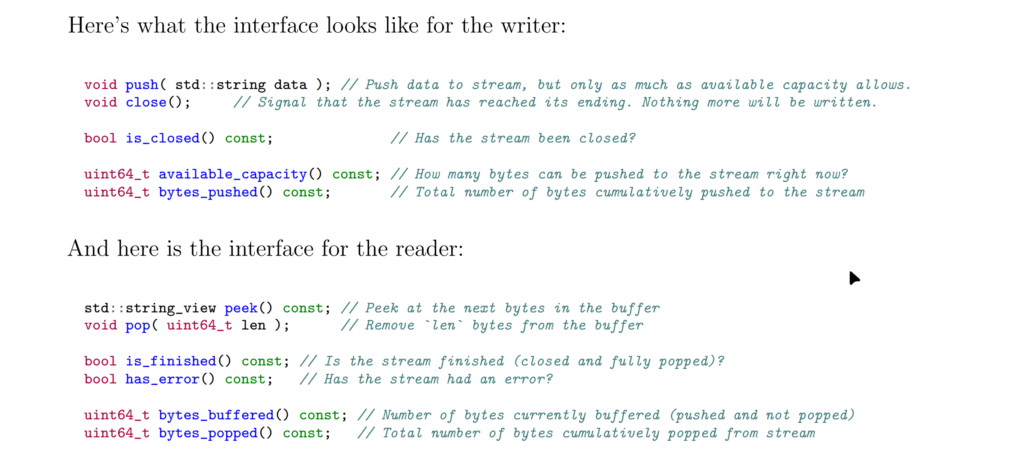
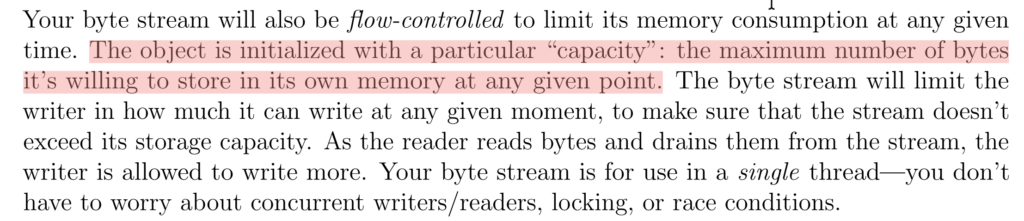
首先我们要理解 capacity 的概念:
我们借用 Checkpoint 1 的图来理解下:
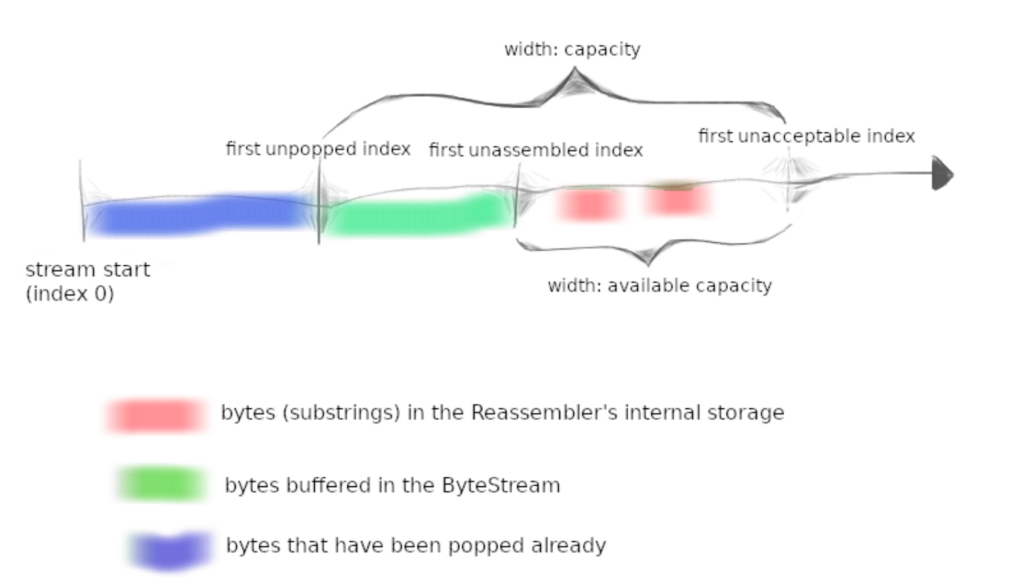
整个轴代表一个 ByteStream,可以对其进行 Read 和 Write ,当 Write 时一部分 capacity 会被占用,在 Read(进行 pop 操作)时一部分被占用的 capacity 又会被释放。
一些实现时可能模糊的行为:
- 如果写入了超过容量的数据怎么办?是写入一部分还是全部丢弃?——写入一部分数据;
- 什么时候
Writer::is_closed方法返回true?——当Writer::close被调用后; Reader::peek方法的 next bytes 是几个bytes?—— 任意个,参照byte_stream_helpers.cc中read方法是如何使用Reader::peek的。
解决了上面的疑惑,我们应该就能写出一个简单的实现了。可以用 std::string 来实现一个简单的版本:
class ByteStream
{
public:
  explicit ByteStream( uint64_t capacity );

  // Helper functions (provided) to access the ByteStream's Reader and Writer interfaces
  Reader& reader();
  const Reader& reader() const;
  Writer& writer();
  const Writer& writer() const;

  void set_error() { error_ = true; };       // Signal that the stream suffered an error.
  bool has_error() const { return error_; }; // Has the stream had an error?

protected:
  // Please add any additional state to the ByteStream here, and not to the Writer and Reader interfaces.
  uint64_t capacity_;
  bool error_ {};

  bool closed_ {};
  std::string data_ {};
  uint64_t bytes_pushed_ {};
};
void Writer::push( string data )
{
size_t length = data.length();
uint64_t cap = available_capacity();
if ( length > cap ) {
data = data.substr( 0, cap );
length = cap;
}
this->data_ += data;
bytes_pushed_ += length;
}
void Writer::close()
{ this->closed_ = true; }
bool Writer::is_closed() const
{ return this->closed_; }
uint64_t Writer::available_capacity() const
{ return this->capacity_ - this->data_.length(); }
uint64_t Writer::bytes_pushed() const
{ return this->bytes_pushed_; }
string_view Reader::peek() const
{ return this->data_; }
void Reader::pop( uint64_t len )
{
if ( len > 2048 ) {
this->data_ = this->data_.substr( len );
} else {
this->data_.erase( 0, len );
}
}
bool Reader::is_finished() const
{ return this->closed_ && this->data_.length() == 0; }
uint64_t Reader::bytes_buffered() const
{ return this->data_.length(); }
uint64_t Reader::bytes_popped() const
{ return this->bytes_pushed_ - this->data_.length(); }由于 Winter 2025 的 Benchmark 修改了测试方法,导致统计口径的差异,难以和其他人的结果进行比较。这里使用 Winter 2024 的 Benchmark。
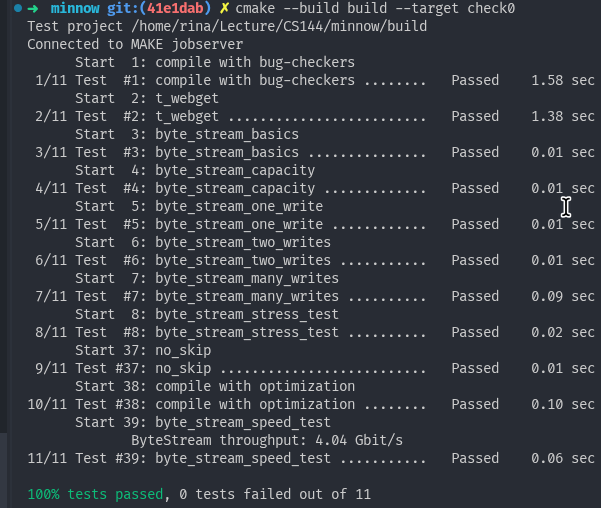
最终效率在 4 Gb/s 左右,比起别人的实现慢了四倍左右,肯定不能忍。我们着手来优化一下。由需求易知我们需要一个 FIFO 的数据结构,我们可以使用 std::deque<string> 来作为底层的数据结构。
我们需要多维护一个 size_ 变量,因为无法直接读出 deque 中字符串的总长度了,在 push 时加上对应 len ,在 pop 时减去对应 len 即可。push 操作是简单的,而 pop 只需分段 pop 出长度即可。

翻了两倍多,但是比起别人的还是可以继续优化。我们的性能瓶颈主要发生在 substr 这个操作上,它会产生一个新字符串,在这个过程中会发生拷贝,导致执行缓慢。我们可以使用 C++ 17 的 std::string_view 来替代。简单来说,std::string_view 相当于指向原字符串的指针。对 std::string_view 进行 substr 操作只会导致指针的移动,从而提高操作效率。代价是一小部分的内存消耗。
使用 std::string_view 时要注意将原字符串保存到内存中,不然会导致 Dangling Pointer 。
class ByteStream
{
public:
  explicit ByteStream( uint64_t capacity );

  // Helper functions (provided) to access the ByteStream's Reader and Writer interfaces
  Reader& reader();
  const Reader& reader() const;
  Writer& writer();
  const Writer& writer() const;

  void set_error() { error_ = true; };       // Signal that the stream suffered an error.
  bool has_error() const { return error_; }; // Has the stream had an error?

protected:
  // Please add any additional state to the ByteStream here, and not to the Writer and Reader interfaces.
  uint64_t capacity_;
  bool error_ {};

  bool closed_ {};
  std::deque<std::string_view> data_ {};
  std::deque<std::string> owned_data_ {};
  uint64_t bytes_pushed_ {};
  uint64_t size_ {};
};
#include "byte_stream.hh"
#include "debug.hh"
using namespace std;
ByteStream::ByteStream( uint64_t capacity ) : capacity_( capacity ) {}
void Writer::push( string data )
{
size_t length = data.length();
uint64_t cap = available_capacity();
if ( length > cap ) {
data = data.substr(0, cap);
length = cap;
}
if (length == 0) {
return;
}
this->owned_data_.emplace_back( std::move( data ) );
this->data_.push_back( string_view { this->owned_data_.back() } );
bytes_pushed_ += length;
this->size_ += length;
}
void Writer::close()
{ this->closed_ = true; }
bool Writer::is_closed() const
{ return this->closed_; }
uint64_t Writer::available_capacity() const
{ return this->capacity_ - this->size_; }
uint64_t Writer::bytes_pushed() const
{ return this->bytes_pushed_; }
string_view Reader::peek() const
{
if ( this->data_.empty() ) {
return string_view{};
}
return this->data_.front();
}
void Reader::pop( uint64_t len )
{
this->size_ -= len;
while (len > 0) {
auto front_sv = this->data_.front();
if (len >= front_sv.size()) {
len -= front_sv.size();
this->data_.pop_front();
this->owned_data_.pop_front();
} else {
this->data_.front() = front_sv.substr(len);
break;
}
}
}
bool Reader::is_finished() const
{ return this->closed_ && this->size_ == 0; }
uint64_t Reader::bytes_buffered() const
{ return this->size_; }
uint64_t Reader::bytes_popped() const
{ return this->bytes_pushed_ - this->size_; }
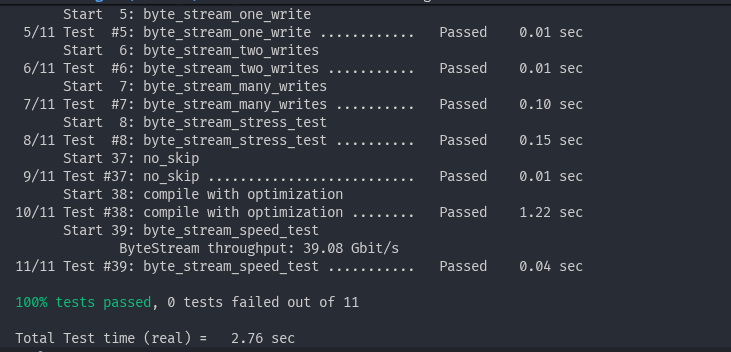
最后 Benchmark 出来的成绩在 39 Gb/s,对比最开始的 4 Gb/s 翻了快 9 倍!满足了。
Lab 00 总结
数据结构:string、deque
语言特性:std::move、std::string_view